
Comic maker - Arcstory
Wallet Passes AllianceComics
2.937.00 Reviews
- Version
- 4.3.0
- Installs
- 100.00K
- Age Rating
- Everyone
Screenshots
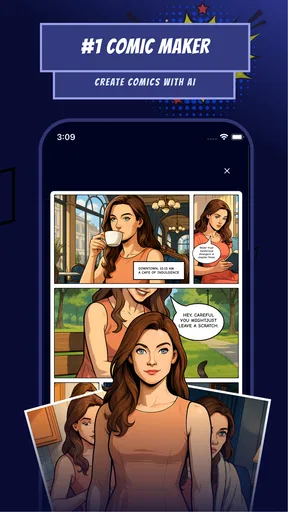
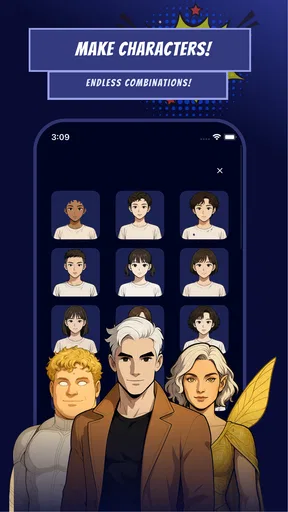
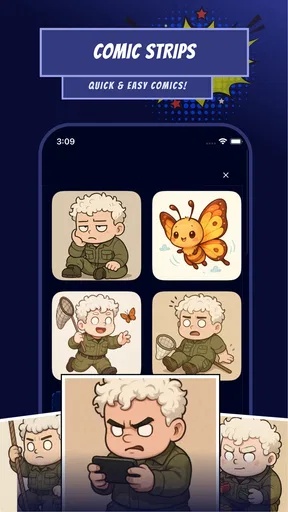
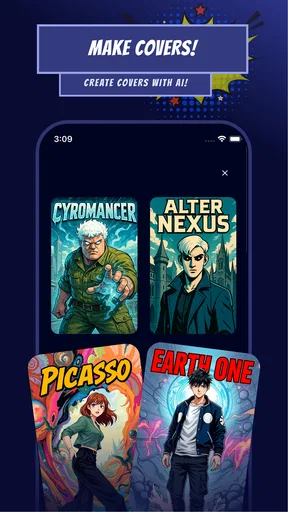
Our Review of Comic maker - Arcstory
 Analysis by Appyee
I like the idea of making a comic in short, repeatable sessions rather than waiting until I can draw a whole page from scratch. That is the appeal of Comic maker - Arcstory: it gives a beginner a way to explore comic-making through AI-assisted creation, while still asking them to make choices about the story and how it should read. I would treat it as a creative starting point, not as a replacement for an artist’s full drawing and editing toolkit.
A practical first session
My advice is to begin with a small scene, not a sprawling series. Decide who is in it, what changes from the first panel to the last, and what the reader should understand without explanation. That simple outline gives the app’s comic-making tools a clearer job: helping you turn a sequence of beats into a readable page. It also makes it easier to judge whether the generated result suits your idea instead of accepting an image simply because it looks polished.
A useful first project might be a brief exchange between two characters, a visual joke, or a short manga-style moment. Keep the dialogue concise and give each panel one main purpose. If you are creating for a friend or a school activity, this approach is easier to finish and revise than a long story with many characters and locations. I would save the bigger world-building ideas for after you have learned what kind of results you can shape consistently.
That small-scale approach matters because AI-generated comics involve direction as well as selection. A prompt or creative instruction that tries to cover a character’s appearance, mood, setting, action, and dialogue all at once can leave you with a result that is hard to steer. I prefer to settle the scene first, then refine one concern at a time. This makes the process more deliberate and helps me notice which parts of the outcome are serving the story and which are distracting from it.
Build a repeatable workflow
For a recurring character, I would keep a short written reference outside the creative session: a few defining traits, the character’s role, and the way they speak. Reusing the same description can help keep each new scene pointed in the same direction, even when the visual output varies. This is a practical habit rather than a hidden app feature, but it can prevent a series from feeling like unrelated experiments.
I would also review a page in two passes. First, read only the sequence of images and ask whether the action is understandable. Then read the speech and captions, checking whether the words add something rather than describe what the picture already shows. This catches a common beginner problem: panels that look attractive individually but do not make a clear story when placed together.
When a result is close but not right, change one element of your direction and try again rather than rewriting the entire idea. A controlled revision makes it easier to learn what influenced the result. It is especially helpful when working on a short comic during a commute or a break, because you can return to the same premise without having to reconstruct every decision from memory.
Where it fits among comic tools
Arcstory sits in a different creative lane from traditional drawing apps. A drawing tool gives a skilled artist precise control over lines, anatomy, and page composition, but it also expects the user to supply much of the artwork. An AI-oriented comic maker can be a more approachable route for someone who has stories to tell but little drawing experience. The trade-off is that generated imagery may not offer the same fine control or consistency that a practiced illustrator can achieve by hand.
It is also not the same as writing a comic script in a notes app or document editor. A plain writing tool is better for outlining a long plot, tracking character arcs, and revising dialogue without visual distractions. Arcstory is more relevant once you want to see a story take comic form. I would happily plan a longer story elsewhere, then bring a manageable scene into a visual creator rather than trying to do every part of the process in one place.
For a creator who wants exact control over every panel, lettering choice, and visual detail, a conventional illustration or page-layout app may be the better home. For a curious beginner, a casual storyteller, or someone looking for a quick visual draft, Arcstory’s AI angle may lower the barrier to trying the format. The right choice depends less on whether you can draw and more on how much control you need over the finished page.
Comic maker - Arcstory is a free comics app from Wallet Passes Alliance, and it is rated for Everyone. It has an average rating of 2.7 from around 563 ratings, so I would approach it with realistic expectations and try a small project before investing much time. It has over 100,000 installs, which suggests that people are giving it a try, but popularity alone does not tell me whether its creative workflow will suit my own needs.
Check the practical details first
Before building a larger project, I would check the current app version and the available settings on my device. The current version is 3.8.9, and the minimum Android requirement is version 7.0. Those details are useful when deciding whether an older device is suitable, but a compatible operating system does not guarantee that every creative task will feel smooth on every screen. I would test a single scene before planning a substantial comic around it.
The app includes in-app purchases ranging from $0.99 to $99.99 per item. Since the price range is broad, I would look carefully at what any purchase offers and whether it is relevant to the way I plan to create. A free starting point makes experimentation easier, but it is sensible to avoid buying anything until I understand what I can already accomplish and where I am actually running into a limitation.
It was released on June 3, 2024, and its low average rating makes me especially careful about expecting a perfectly smooth experience. I would treat my first session as a hands-on test: see whether the interface makes sense to me, whether the outputs fit my intended style, and whether the process feels enjoyable enough to repeat. If those basics do not work for a small scene, paying for more options is unlikely to solve the underlying mismatch.
Who will get the most from it
I would recommend trying Arcstory if you are curious about making comics but feel blocked by drawing, or if you want to turn a compact story idea into a visual experiment. It can also suit someone who enjoys comparing variations and refining a concept through repeated attempts. The best use is exploratory: create a scene, inspect how it reads, and decide what to change before expanding it into a longer project.
I would skip it if your main goal is professional-grade control, reliable visual continuity across a large cast, or a carefully typeset publication-ready page. Those needs call for a workflow where every image and layout decision can be managed closely. I would also choose a writing app first if the story is still a loose collection of ideas; organizing the plot before generating images can save time and keep the comic focused.
For a realistic everyday use, imagine having a few minutes after work and an idea for a funny exchange. I would write the setup and punchline in plain language, make a short visual version, then check whether the reader can follow the joke without extra explanation. If the scene works, I can keep developing the concept. If it does not, I have learned something from a small trial instead of spending an evening building a comic that never quite comes together.
Getting Started with Comic Maker - Arcstory
Diving into the world of Comic Maker - Arcstory is as easy as pie. The app is available for both Android and iOS, and downloading it is just a tap away. Once installed, you'll be greeted by a user-friendly interface that's designed to get your creative juices flowing.
The first thing you'll notice is the wealth of tools at your disposal. From customizable panels to a robust library of characters and backgrounds, Arcstory provides everything you need to start crafting your narrative. The layout is intuitive, allowing even the most novice users to navigate with ease.
Features That Stand Out
One of the coolest features of Arcstory is its versatile panel design. You can effortlessly adjust the size and shape of each panel, giving you complete control over your comic's layout. This flexibility allows you to create dynamic and engaging storytelling sequences.
Another highlight is the app's character customization. Whether you want to create a superhero, a villain, or a quirky sidekick, the options are endless. You can tweak everything from hairstyles to outfits, ensuring your characters are as unique as your story.
For those of us who might not be the best at drawing, fear not! Arcstory comes with a vast array of pre-designed characters and backgrounds. These ready-to-use elements can be easily incorporated into your comics, making the process smooth and enjoyable.
Crafting Your Story
Storytelling is at the heart of any great comic, and Arcstory doesn’t disappoint here. The app offers a seamless way to script your story, complete with text bubbles and captions. You can choose from various fonts and styles to match the tone of your narrative.
One feature I particularly love is the ability to add sound effects and motion lines. These little touches can really bring your comic to life, adding a professional feel to your work.
Sharing Your Masterpiece
Once you've completed your masterpiece, sharing it with the world is a cinch. Arcstory offers multiple export options, allowing you to save your comic as an image, PDF, or even share it directly on social media platforms. This makes it easy to showcase your work to friends, family, or a broader audience.
For those looking to collaborate, the app also supports sharing projects with other users. This feature is perfect for team projects or for getting feedback from fellow creators.
A Few Final Thoughts
Overall, Comic Maker - Arcstory is an incredible tool for anyone interested in comic creation. Its combination of user-friendly design, powerful features, and creative flexibility makes it a top choice for both beginners and seasoned artists alike.
So, if you're ready to unleash your inner storyteller, give Arcstory a try. Who knows? You might just create the next big hit in the comic world!
Privacy and Permissions
See what permissions an app requests and how it handles your data.
- Wi-Fi connection information
- view Wi-Fi connections
- Other
- view network connections, full network access, control vibration, prevent device from sleeping, Google Play license check, read Google service configuration
Verdict
Strengths of Comic maker - Arcstory
- Intuitive interface simplifies comic creation.
- Wide range of templates to get started quickly.
- Customizable characters and backgrounds.
- Offline mode available for uninterrupted work.
- Frequent updates with new features and content.
Limitations of Comic maker - Arcstory
- Limited export options for completed comics.
- Some features locked behind a paywall.
- Occasional lag on older devices.
- Ads can be intrusive in the free version.
- Limited font choices for text bubbles.
Other Releases by Wallet Passes Alliance
View All
WalletPasses | Passbook Wallet
Travel & Local4.5

House Design Plan 3D App
House & Home4.0

Funky Smiles Live Wallpaper
Personalization4.7

Mirror Link
Libraries & Demo3.2
Similar Picks in This Category
View All
WEBTOON: Manga, Comics, Manhwa
NAVER WEBTOON4.6

MangaToon: Comic & Manga
MangaToon4.3

네이버 웹툰 - Naver Webtoon
NAVER WEBTOON4.3

Tapas – Comics and Novels
Tapas Entertainment Inc.4.2

Lezhin Comics - Daily Releases
LEZHIN ENTERTAINMENT3.3

WebComics - Webtoon & Manga
WEBCOMICS HOLDINGS HK LIMITED4.4
Frequently Asked Questions
What is Comic Maker - Arcstory and what does it offer?
Comic Maker - Arcstory is an innovative app that allows users to create their own comic strips and graphic novels. It offers a variety of templates, character designs, and backgrounds to choose from. Users can also customize speech bubbles and text, making it easy to tell their stories creatively and professionally.
Is Comic Maker - Arcstory user-friendly for beginners?
Yes, Comic Maker - Arcstory is designed with a user-friendly interface that caters to both beginners and experienced users. The app provides intuitive tools and step-by-step guides to help new users navigate through the comic creation process, ensuring a smooth and enjoyable experience.
Does Comic Maker - Arcstory require an internet connection?
Comic Maker - Arcstory can be used offline for creating and editing projects, which is perfect for users on the go. However, an internet connection is necessary for downloading additional content packs, updating the app, and sharing your comics online through social media or email.
Are there in-app purchases or subscriptions in Comic Maker - Arcstory?
Yes, Comic Maker - Arcstory offers in-app purchases for additional content, such as exclusive character packs and premium templates. There is also an optional subscription model that provides access to all features and content without limitations, which is ideal for avid creators seeking a comprehensive experience.
What platforms is Comic Maker - Arcstory available on?
Comic Maker - Arcstory is available on both Android and iOS platforms. Users can download the app from the Google Play Store or Apple App Store. Ensure your device meets the minimum system requirements for optimal performance and to fully enjoy the app's features.
